Ver interfaces, cerrar sesión y eliminar
iscsiadm -m node --print --interface

iscsiadm -m node -T <iqn> -p <IP>:<PUERTO> -u

iscsiadm -m node -o delete -T <iqn>
Verificar:
iscsiadm -m session
Ver interfaces, cerrar sesión y eliminar
iscsiadm -m node --print --interface iscsiadm -m node -T <iqn> -p <IP>:<PUERTO> -u iscsiadm -m node -o delete -T <iqn>
iscsiadm -m session
Partimos de que tenemos dos URL de los sitios donde se va a descargar la aplicación:
For comment: Zabbix Share - Proxmox VMs Backup Status Template
The comment is still in pending status, I paste it here:
Hi,
I have modified the status script to process several backup storages for different jobs. If you have only a job backup the script works as original.

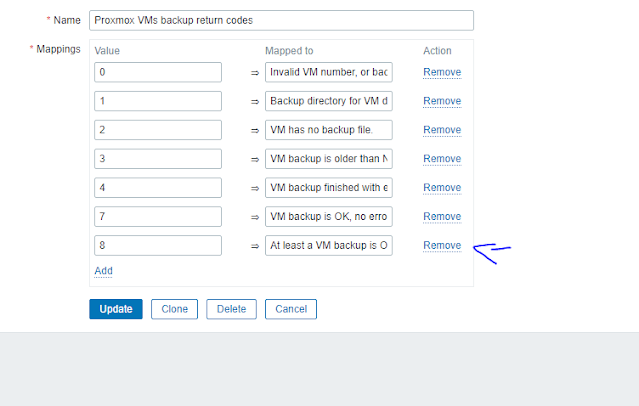
I have added an 8th status: 8 => At least a VM backup OK, but not all. Thus, we know that at least a backup is ok, but not all our jobs were successfully executed.

[....]

The definition of the 8th state trigger prototype:
Name: At least a VM backup for VM {#VM_NUMBER} OK, but not all
Expression: {Template App Proxmox VMs Backup Status:proxmox-vms-backup-status[{#VM_NUMBER},{$BACKUP_PERIOD}].last()}=8
Add value mapping description 8 mapped to "At least a VM backup is OK, but not all"
Modified script:
#!/bin/bash

# Script for checking ProxMox virtual machines backup. For use in Zabbix. Skygge@2016
# Modified: MR_Andrew, 2018. Fran Couñago, 2021
# Special thanks: Max Dark, Marinero from cyberforum.ru

#Variables

backupconfig='/etc/pve/vzdump.cron'
storageconfig='/etc/pve/storage.cfg'
configdir='/etc/pve/local/qemu-server'

# Check every VM for existing backup files and check if they're newer than 7 days

mapfile -t bckstorarray < <( awk  -v vm=$1 '$0 ~ vm {for(i=1;i<NF;i++) {if( $i ~ /--storage/) print $(i+1)}}'  $backupconfig|sort|uniq)
# read physical backup path from storage configuration file for VM $1
if [ ${#bckstorarray[@]} = 0 ]; then
	#echo "Invalid VM number, or backup for VM $1 is not configured."
	echo 0
else
	#Array with multiple errors
	ONEBAD=0
	ONEGOOD=0
	for backupstorage in "${bckstorarray[@]}"
	do
		backupdirectory=`cat $storageconfig|grep -w -A 1 $backupstorage|grep path|rev|cut -d " " -f 1|rev`
		#echo BCKDIR=$backupdirectory
		if [ -d $backupdirectory/dump ]; then
				# check if backup file(s) exists on backup path for VM $1
				backup=`ls $backupdirectory/dump/|grep "$1" |grep -v -E "log|tmp|dat"|wc -l`
				if [ "$backup" = "0" ]; then
					#echo "VM $1 has no backup file."
					ONEBAD=2
				else
					# check if backup file is newer than $2 day(s) for VM $1
					newbackup=`find $backupdirectory/dump/ -type f -name "*$1*" -not -name "*.log" -not -name "*.tmp" -not -name "*.dat" -mtime -$2 | sort -nr | head -1|wc -l`
						if [ "$newbackup" = "0" ]; then
							#echo "VM $1 backup is older than $2 day(s)."
							ONEBAD=3
						else
								#check last log file for errors
								backuplastlog=`ls $backupdirectory/dump/ | grep "$1" | grep log | tail -1`
								backupresult=`cat $backupdirectory/dump/$backuplastlog | grep -i -E "ERROR|FAILED"`
										if [ "$backupresult" = "" ];then
												#echo "VM $1 backup is OK, no errors found."
												ONEGOOD=1
										else
												#echo "VM $1 backup finished with errors. Please, check logs."
												ONEBAD=0
										fi
						fi
				fi
		else
			#echo "Backup directory for VM $1 does not exists."
			ONEBAD=1
		fi
	done
	if [ $ONEGOOD = 1 ]; then
		if [ $ONEBAD != 0 ] ; then
			echo 8
		else
			echo 7
		fi
	else
		echo $ONEBAD
	fi
fi
Add Trigger Prototype:

Abrir la Xbox Game Bar: [Windows]+[G]
Grabar directamente: [Windows]+[Alt] + [R]
El fichero de configuración de RDP (una vez salvado) se puede editar con un fichero de texto, en este fichero si hemos puesto la opción de usar todos los monitores para la sesión remota nos aparecerá una línea que pone:
use multimon:i:1
para seleccionar los monitores en concreto que queremos utilizar debemos añadir la línea:
selectedmonitors:s:1,2
donde 1 y 2 son los identificadores de los monitores, estos identificadores pueden obtenerse ejecutando
mstsc /l

Fuentes:
Usar Add-ApxPackage
Para todos los usuarios usar Add-ProvisionedAppPackage
Por ejemplo para añadir un paquete en la imagen de sistema operativo que estamos usando (ene este casno no requiere fichero de licnecia) se usa:
Add-ProvisionedAppPackage -Online -Skiplicense -PackagePath paquete.AppxPara ver los links de descarga fácimente https://store.rg-adguard.net/
Si tiene dependencias habría que ponerlas de la siguiente forma:
Add-ProvisionedAppPackage -Online -SkipLicense -PackagePath paquete.AppxBundle -DependencyPackagePath paquete1.Appx,paquete2.Appx,paqueten.Appx


Equipo\HKEY_LOCAL_MACHINE\SOFTWARE\Policies\Microsoft\Windows\safer\codeidentifiers


